(04)Case studyHR & payroll platform

Teache

An HR and payroll platform where admins run payroll, time, training and background checks, and employees and contractors see their own. I built the whole front end in React, connected it to the API, and built sign-in and role-based access.

My role
Front end, API & auth
Built with
React, TypeScript, Redux Toolkit
How it works Private build
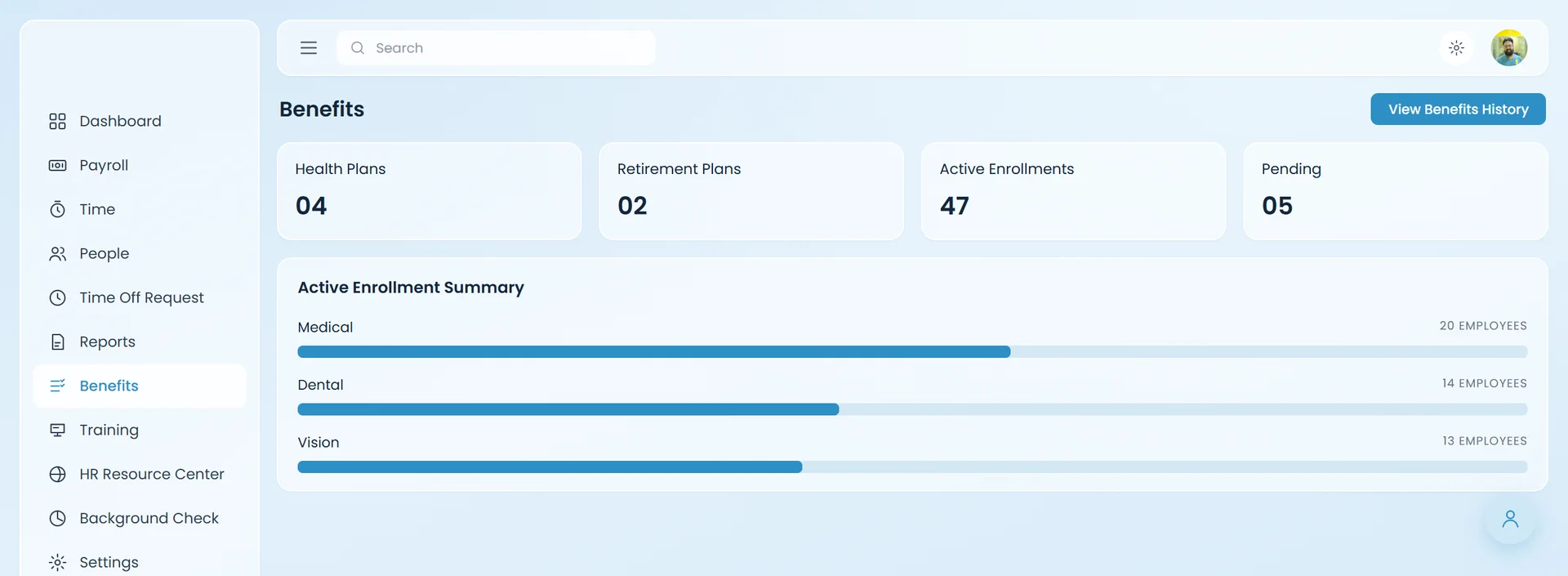
Teache benefits: plans and active enrollments
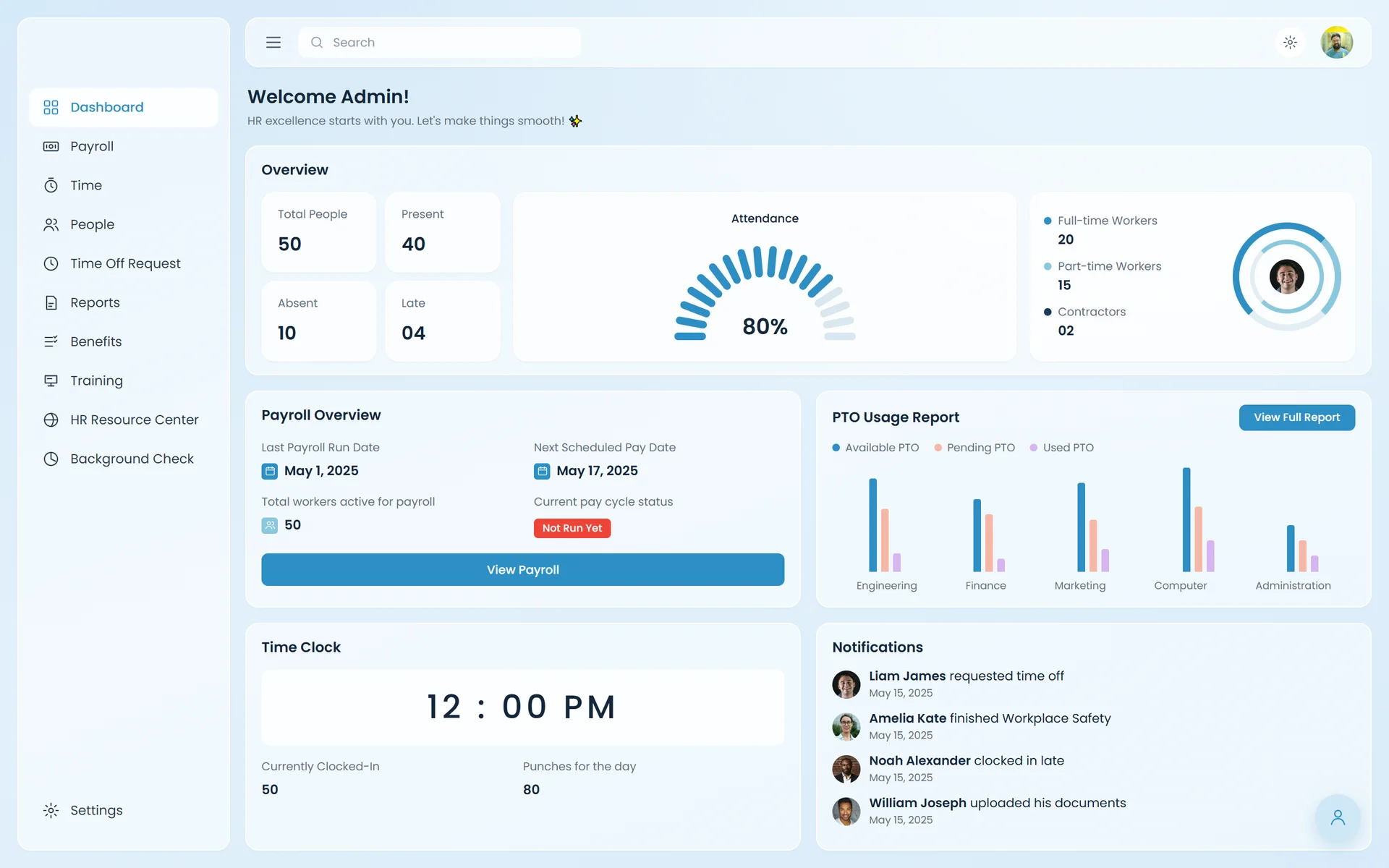
The Teache admin dashboard: people, attendance, payroll and PTO at a glance
(01)In short

01

What the client wanted

One HR and payroll platform for a whole company: admins run payroll, time, training and checks, while employees and contractors see their own pay, hours and time off.

02

What I built

The whole front end in React and TypeScript, connected to the backend's API, plus sign-in and role-based access, so each person sees only what their role allows.

03

The result

The admin side and a separate set of screens for each kind of user, built side by side with the backend developer, one stage at a time.

admin modules, from payroll to background checks
10admin modules, from payroll to background checks
kinds of user: admin, employee, contractor
3kinds of user: admin, employee, contractor
build stages, in the same order on both sides
6build stages, in the same order on both sides
developers: me on the front end, one on the back end
2developers: me on the front end, one on the back end

Counted from the design and the build

(02)How we built it6 stages

Built in sync, stage by stage.

Teache was built by two people side by side: me on the front end and a backend developer on the API. Before writing code we mapped the whole flow from the Figma design, then built it in the same order on both sides.

  1. 1

    Together

    Map the flow

    We went through the design screen by screen and agreed what each role needs and the order to build it in.

  2. 2

    In sync

    Authentication

    Sign-in first. Every other screen depends on knowing who is there.

  3. 3

    In sync

    Authorization

    Then roles: what an admin, an employee and a contractor can each see and do.

  4. 4

    In sync

    Onboarding

    With accounts and roles in place, the steps a new person goes through to join, for employees and contractors.

  5. 5

    In sync

    The admin side

    Admin came first: payroll, time, people, time off, reports, benefits, training, HR resources and background checks.

  6. 6

    In sync

    Every other role

    Then each role in turn: salaried, hourly and per-diem employees, and contractors, each with their own dashboard, pay and time.

Front end

Me

  • Every screen, in React and TypeScript
  • Connected each screen to its API endpoint
  • Sign-in and role-based access across the app

Both of us

Together

  • Mapped the flow from the Figma design
  • Agreed the build order
  • Built each stage side by side

Back end

Backend developer

  • The API behind every screen
  • The server side of each stage, in step with the front end
(03)What I built4 highlights

Everything HR, in one place.

Each highlight says what it does for the people using it, and how it works underneath.

01

Payroll, in one run.

One page shows the pay period, every worker's hours, rate, PTO and bonus, and the totals for gross pay, net pay and taxes. Payments can be adjusted before the run.

For the team

Check everyone's pay on one screen, then run payroll.

Under the hood

Built in React and TypeScript; the table and totals load from the API with TanStack Query.

Biweekly payroll with totals and every worker's pay

02

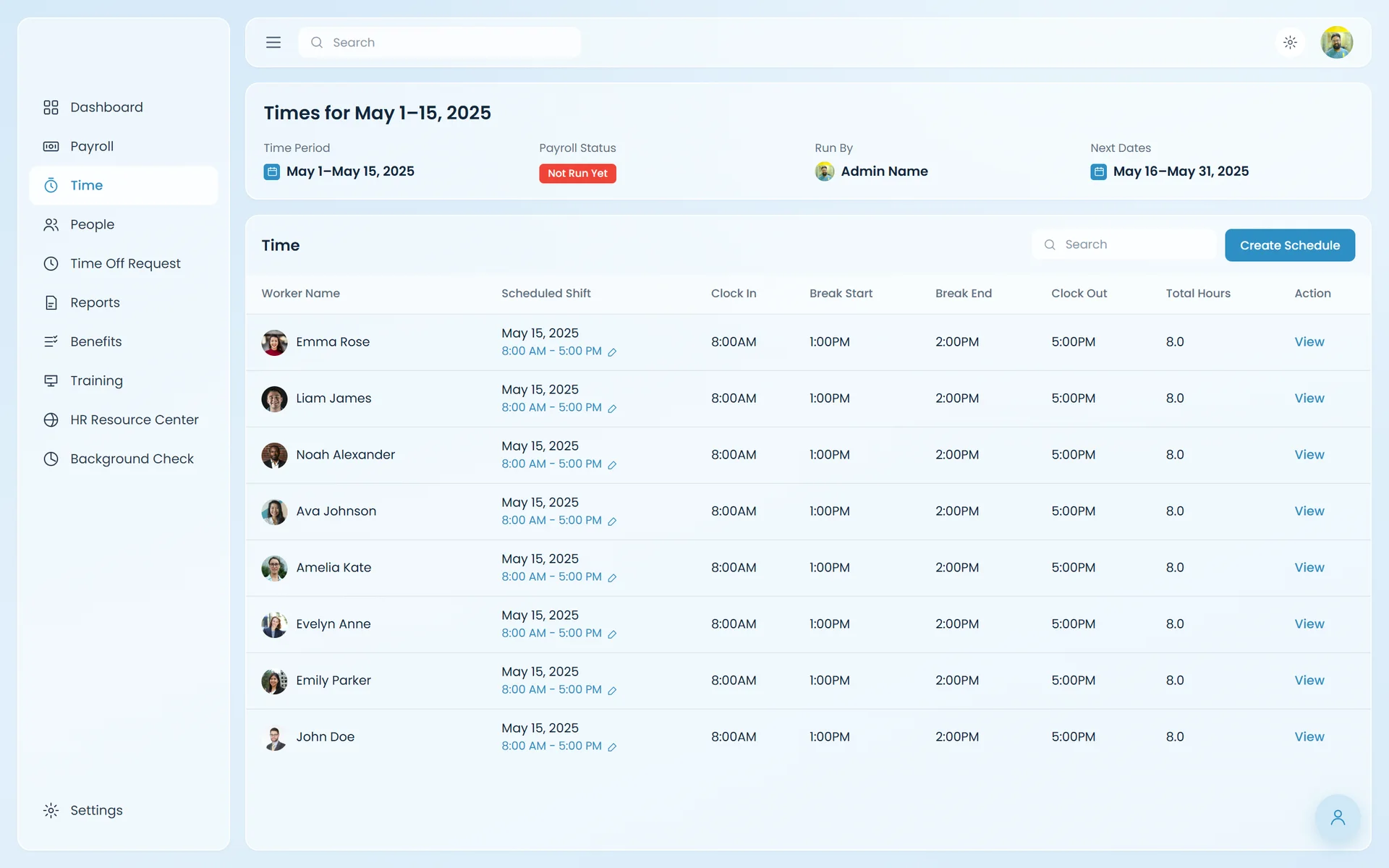
Hours, shift by shift.

Every worker's scheduled shift, clock in and out, and breaks for the pay period, with a button to create the next schedule.

For the team

See who worked when, without chasing timesheets.

Under the hood

Each row comes from the backend's time API, through Axios.

Times for the pay period: shifts, clock-ins and breaks

03

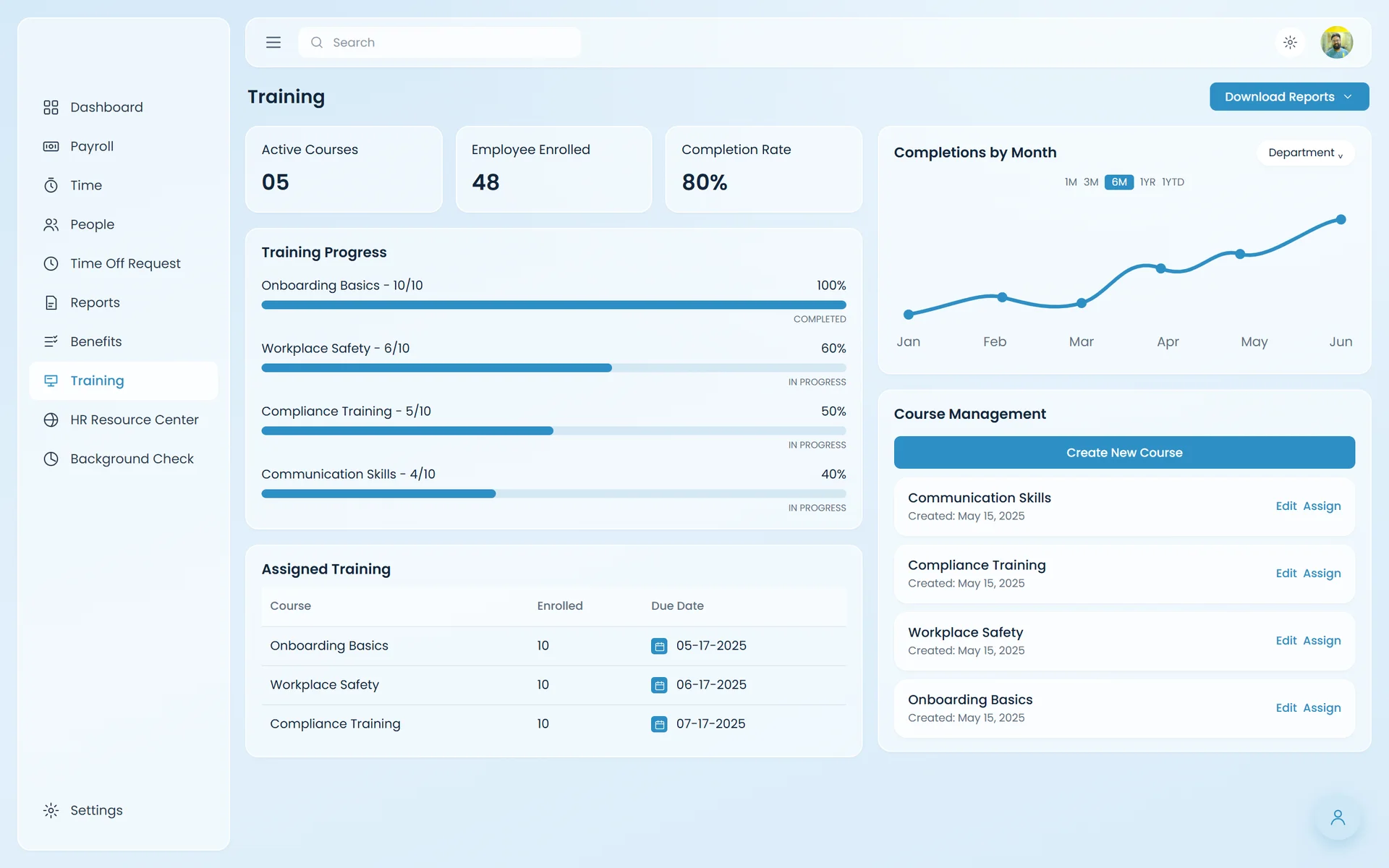
Training, tracked.

Active courses, enrollments and completion rate, each course's progress, assigned training with due dates, and a place to create and assign new courses.

For the team

Know who has finished what, and who's due next.

Under the hood

Reusable progress, table and chart components shared across the admin screens.

Training progress, assigned courses and course management

04

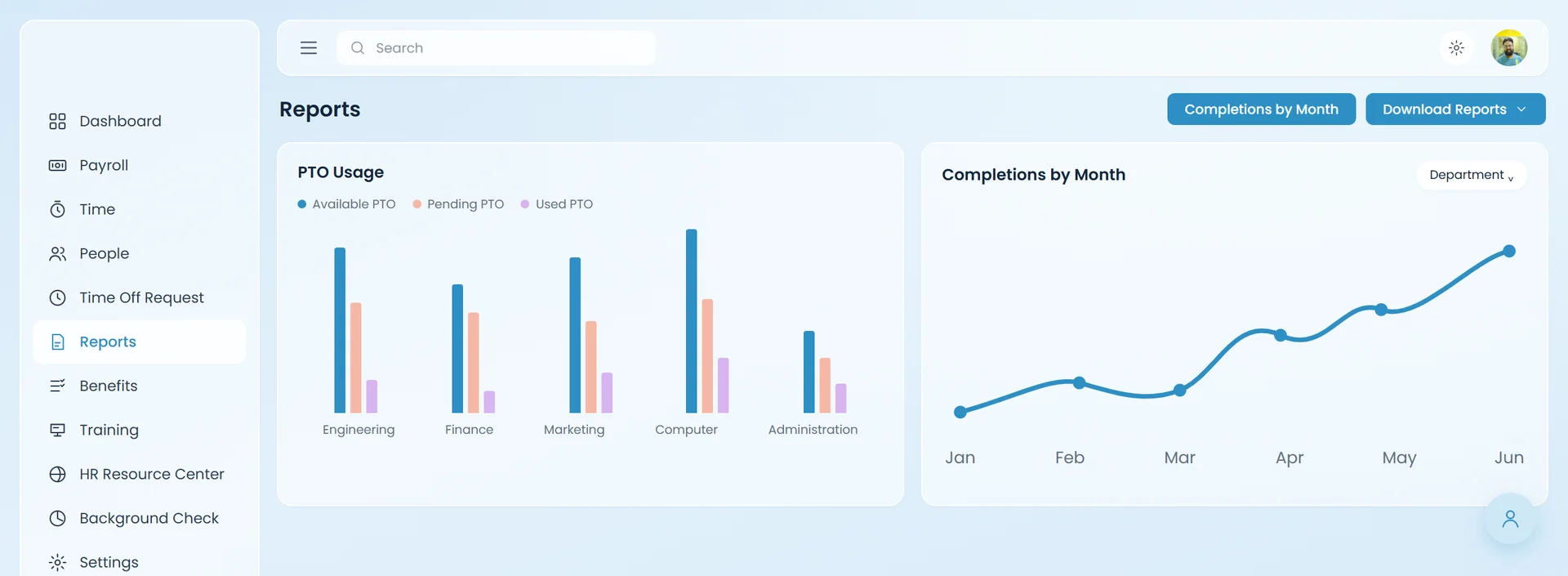
Reports for every department.

PTO usage by department and training completions by month, with a download for the full reports.

For the team

The big picture in two charts.

Under the hood

Charts built from the same API data the other screens use.

Reports: PTO usage and completions by month

Teache is private, so these screens are rebuilt from the client's Figma design. Names, dates and amounts are sample content in the style of the design; the portraits are real photos from Unsplash.

(04)Who sees whatAuthorization

One app, a different view for each role.

After sign-in, the app knows each person's role and shows only what that role is allowed to see and do.

Admin

The HR and payroll team

  • Runs payroll and adjusts payments
  • Approves or denies time off
  • Manages people, schedules, training and benefits
  • Requests background checks and sees reports

Employee

Salaried, hourly and per-diem

  • Sees their own pay, time and PTO
  • Requests time off
  • Completes training and acknowledgements
  • Can't see other people's pay or run payroll

Contractor

Hourly and independent

  • Has their own dashboard and time clock
  • Sees their own payments
  • Goes through their own onboarding
  • Sees only their own records
Time off requests with Approve and Deny
Time off. Only admins see everyone's requests and can approve or deny them.
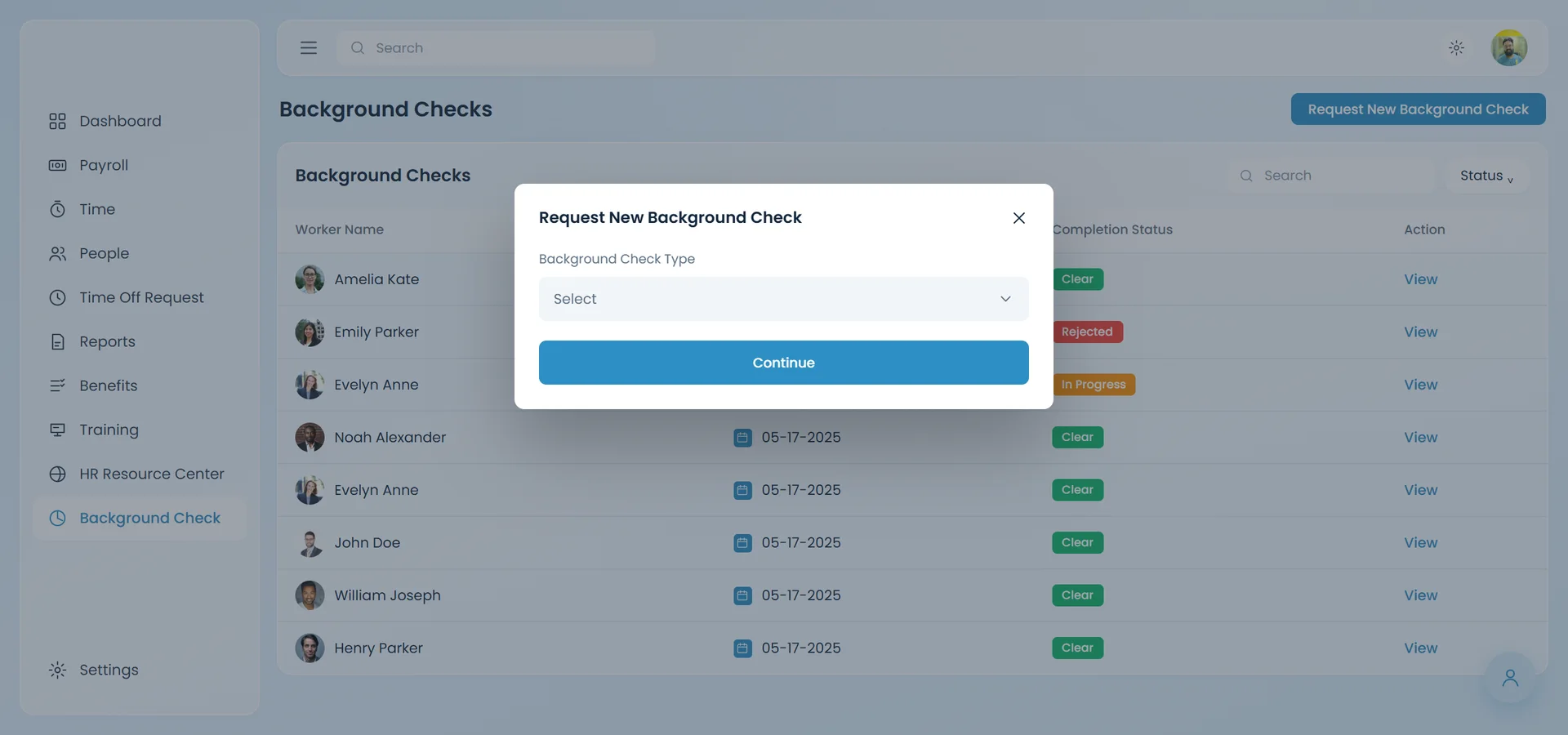
Requesting a background check
Background checks. An admin-only page to request and follow each check.

Teache is private, so these screens are rebuilt from the client's Figma design. The employee and contractor screens aren't shown.

(05)How it works

Like key cards, for every role.

Think of an office with key cards. Everyone signs in at the front door, and their card only opens the rooms their job needs: an admin's opens payroll and reports, an employee's opens their own pay and time off.

In the app, sign-in tells the front end who the person is and what role they have, and every page and action checks that role before it shows. Each screen gets its data from the backend's API through TanStack Query and Axios, and Redux Toolkit holds the state the whole app shares.

  1. Step 1

    A person signs in

    Sign-in screens wired to the backend's auth API

  2. Step 2

    The app learns their role

    Admin, employee or contractor, kept in app state

  3. Step 3

    They see only their pages

    Routes and actions gated by role

  4. Step 4

    Every screen loads real data

    TanStack Query and Axios against the backend's API

Built withReactTypeScriptTailwind CSSRedux ToolkitTanStack QueryAxiosRole-based access
(06)The result

Built side by side, one stage at a time.

Mapping the flow first and building in the same order on both sides meant the front end and the API grew together: sign-in and roles, then onboarding, the admin side and every other role.

Open to work

Have a project like this in mind?

I build complete web and mobile apps, for full-time roles or freelance work, remote in any time zone. A quick call is the fastest way to start.

I reply within a day, usually less.